Become a LUXA Validator
LUXA (luxa-1) is a permissionless network: anyone can run a validator without asking for approval. This guide explains how to set up a node, create your validator, and how the LUXA team can help you get started.



How we work together
-
Independent operators. You run your own infrastructure and keys. The LUXA team never has access to them.
-
Starter funds. To help new operators get started, we send 10 LUXA to applicants we verify. It is a one-time grant, enough for a self-bond and transaction fees.
-
Delegations and listing. Extra delegations and a place on our validators page are decided by the team and are not guaranteed.
-
Rewards. Inflation is currently 0%, so rewards come only from transaction fees. Do not expect meaningful income.
Requirements
Step 1: install the node
Clone the official repository, switch to the v1.0.0 tag, compile and install the binary:
git clone https://github.com/luxaecosystem/luxa-chain.git
cd luxa-chain
git checkout v1.0.0
make install
luxad version --long
Step 2: initialize and connect
Initialize the node moniker and download the official genesis.json for luxa-1:
luxad init YOUR_MONIKER --chain-id luxa-1
curl -s https://luxaecosystem.xyz/genesis.json > ~/.luxa/config/genesis.json
sha256sum ~/.luxa/config/genesis.json   # must equal: 3da9b57fa81220b9af6bd78f83956116579305d6474ea08b7756d70167199fa4
Edit ~/.luxa/config/config.toml:
persistent_peers = "c6eb98f7a65a5fd23ef5c9004d792ec9a8e0b803@51.170.130.74:26656"Edit ~/.luxa/config/app.toml:
minimum-gas-prices = "0.001uluxa"Step 3: run as a service
Create a systemd service file (e.g., /etc/systemd/system/luxad.service) to ensure continuous operation:
[Unit]
Description=LUXA node
After=network-online.target

[Service]
User=luxa
ExecStart=/home/luxa/go/bin/luxad start
Restart=on-failure
RestartSec=5
LimitNOFILE=65535

[Install]
WantedBy=multi-user.target
Wait until luxad status | jq .sync_info.catching_up returns false.
Step 4: create your key and request starter funds
luxad keys add validatorBack up the mnemonic offline. Never share it with anyone, including us.
Official Validator Metadata Registry: luxaecosystem/luxa-validators
Decentralized GitHub registry hosting official logos (PNG) and metadata JSON for all active validators on luxa-1.
Every sovereign validator on LUXA has a dedicated directory inside the luxaecosystem/luxa-validators repository. This standard registry (similar to Cosmos chain-registry) allows the LUXA Block Explorer, DEX, and staking portals to resolve your official node logo, website, Keybase avatar, and security contact.
<moniker>.json):{
"moniker": "YourMoniker",
"identity": "16_HEX_KEYBASE_PGP_FINGERPRINT",
"website": "https://yourvalidator.com",
"security_contact": "security@yourvalidator.com",
"details": "Official validator node securing luxa-1 sovereign consensus.",
"logo": "your_moniker.png"
}Official 4-Step Verification Protocol to Request Starter Funds:
-
1
Follow our Official LinkedIn Page (Mandatory): https://www.linkedin.com/company/luxa-ecosystem. An active, verifiable LinkedIn profile is strictly required for sovereign operator identity attestation.
-
2
Submit Application in the LUXA Telegram Mini-App: Launch the official Telegram Mini-App (@LuxaEcosystemBot) and navigate to the Validator portal. Enter your Validator Moniker, your node account address (
luxa1...obtained vialuxad keys show validator -a), email, LinkedIn profile, official website, Keybase ID, and node details. Upon submission, our system records your application and generates your verification code (e.g. LUXA-VAL-XXXXXX). -
3
Track Record Verification & Code Confirmation (via LinkedIn Message): Send a direct message to our LinkedIn Page with:
- Your validator moniker (matching your Telegram application)
- Your account address, which starts with
luxa1... - Links to your public profiles (LinkedIn profile is mandatory, plus GitHub or X)
- Your validator addresses on other networks (for example
cosmosvaloper1...) so we can verify your operational history - Your Verification Code: Provide the verification code generated in Telegram (e.g. LUXA-VAL-XXXXXX). We verify that this code matches the entry recorded in our system.
-
4
Receive 10 LUXA Starter Funds & Genesis Bond: After identity, code, and track record verification, we dispatch 10 LUXA to your
luxa1...address. The transaction hash is recorded, and your status card in the Telegram Mini-App updates in real-time to 💎 10 LUXA Grant Sent. You can now broadcastcreate-validator.
Real-Time Onboarding Lifecycle: The 4 Chronological Stages
Monitor your live validator onboarding status card in the LUXA Telegram Mini-App as it advances through each sovereign verification phase:
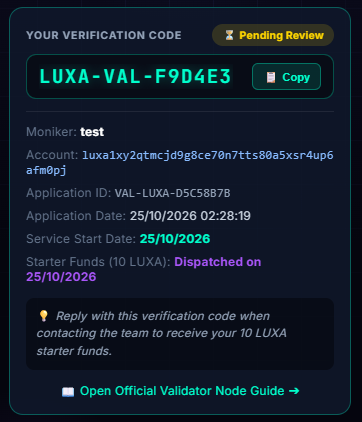
Phase 1: Application Registered in System
Operator registers moniker and luxa1... address in the Telegram app. Our system records the application and issues your verification code (LUXA-VAL-XXXXXX).
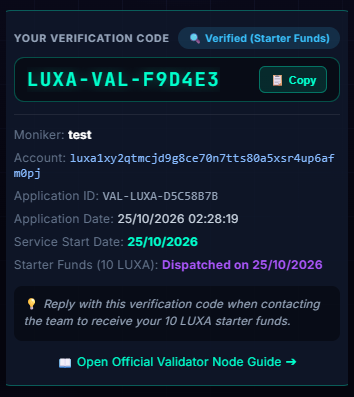
Phase 2: Track Record & Code Confirmation
The operator messages the official LinkedIn page, submitting their public profile, validator history, and confirming their verification code. Once verified in our system, the application advances to Verified.
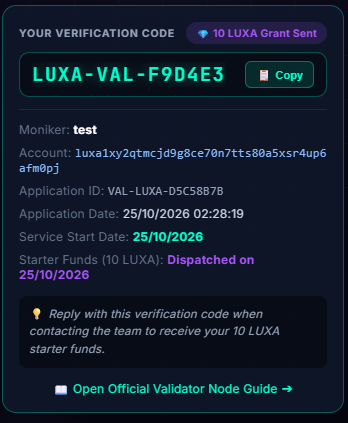
Phase 3: 10 LUXA Starter Funds Dispatched
Protocol operations dispatch 10 LUXA on-chain to the operator's account address. The dispatch timestamp is recorded on the status card, granting the necessary funds for self-bond delegation and transaction gas.
 In Service (Active)
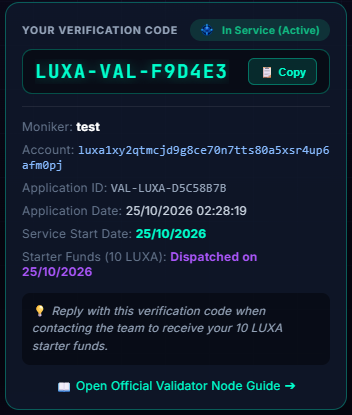
Phase 4: Sovereign Consensus Validator
The validator node is bonded on-chain and actively signing blocks on luxa-1. The status card transitions to In Service with the official node icon, and the operator profile gains the validator badge.
priv_validator_key.json. The LUXA team will never ask for them.
Step 5: create the validator
Get your consensus pubkey with luxad comet show-validator, then create validator.json:
{
  "pubkey": {"@type": "/cosmos.crypto.ed25519.PubKey", "key": "YOUR_KEY"},
  "amount": "5000000uluxa",
  "moniker": "YOUR_MONIKER",
  "identity": "",
  "website": "https://your-site.example",
  "security": "security@your-site.example",
  "details": "Short description of your validator.",
  "commission-rate": "0.10",
  "commission-max-rate": "0.20",
  "commission-max-change-rate": "0.01",
  "min-self-delegation": "1"
}
Submit the staking transaction on-chain:
luxad tx staking create-validator validator.json \
  --from validator --chain-id luxa-1 \
  --gas auto --gas-adjustment 1.5 --gas-prices 0.0025uluxa -y
Verify with luxad q staking validators. The maximum commission rate cannot be changed after creation.
Foundation Delegation Policy
Here is how our delegation policy works:
-
1
Initial Evaluation Period (7–14 days):
We track your node's uptime, missed blocks, and general operational stability to ensure consistent performance (targeting 99%+ uptime). -
2
Ecosystem Contributions:
Since you've deployed a dedicated explorer endpoint and infrastructure, your validator is well-positioned at the top of our delegation priority list. -
3
Delegation Rollout:
Once this initial monitoring window is completed successfully, the Foundation will delegate a baseline stake of LUXA to boost your voting power and validator rewards.
Security rules
Mandatory Operational Guidelines
- Back up
priv_validator_key.jsonoffline and never run it on two nodes at once: double signing is slashed (5%) and permanently removes the validator. - Keep RPC and gRPC private, use a firewall, and update only to releases announced by the team.
- Keep enough LUXA for fees, and monitor uptime: more than 50% of the last 100 blocks must be signed, or the validator is jailed for 10 minutes and slashed 1%.
Network reference
| Chain ID | luxa-1 |
| Denom | uluxa (1 LUXA = 1,000,000 uluxa) |
| Unbonding | 21 days |
| Max validators | 100 |
| RPC | https://rpc.luxaecosystem.xyz |
| REST (API) | https://api.luxaecosystem.xyz |
| Explorer | https://explorer.luxaecosystem.xyz/luxa |
| Source | https://github.com/luxaecosystem/luxa-chain |
| Contact | validator@luxaecosystem.xyz |
Conclusion: you are a validator
If your node is synced and your create-validator transaction succeeded, you are now part of the luxa-1 validator set. A quick checklist:
-
Node synced:
luxad status | jq .sync_info.catching_upreturnsfalse -
Validator visible:
luxad q staking validators -o json | jq '.validators[] | {moniker, status, jailed, tokens}' -
Status is
BOND_STATUS_BONDEDandjailedisfalse -
priv_validator_key.jsonbacked up offline, and only one node uses it -
Firewall: only P2P (26656) is public; RPC and gRPC are private
-
Monitoring and alerts for missed blocks and disk space
Running your validator
- Sign more than 50% of the last 100 blocks. Otherwise the validator is jailed for 10 minutes and slashed 1%. To get out of jail, run
luxad tx slashing unjail --from validator. - Update only to releases announced by the LUXA team, and prepare upgrades in advance.
- Keep enough LUXA in your account to pay transaction fees.
- Update your profile (website, details, contact) at any time with
luxad tx staking edit-validator.
What to expect
- Inflation is currently 0%, so rewards come only from transaction fees. Running a validator is a commitment to the network and not a source of income.
- Voting power comes from stake. New validators start small, and growth depends on delegations from the community.
- Unbonding takes 21 days.
Need help?
Contact us at validator@luxaecosystem.xyz, follow our LinkedIn page https://www.linkedin.com/company/luxa-ecosystem, and check the explorer at https://explorer.luxaecosystem.xyz/luxa to see your validator in the set.